

Call recording
Business phone call recording is a valuable communications tool if you take lots of customer calls. With Dialpad, you can record business phone calls with a click while staying compliant. Try it for free—it takes just a few minutes to sign up and you'll be set up with a virtual number!
- One click to start or pause recording
- AI-powered real-time transcriptions of calls
- And more!
Sign up for a 14-day free trial!
If you run a business that’s always on the phones, or a contact center team, you know how hard it is to keep an eye on everything. (Even an average-size contact center can take hundreds of customer calls a day, and many have to handle customer support, retention, sales, and more.)
So, how do you make sure that your business is actually benefiting from all these phone calls and using that information to improve your services, exceed customer expectations—and protect yourself from potential complaints?
With a good call recording solution, of course.
How does a phone call recording app work?
Most phone systems and software today will have a call recording app built right into the platform. And because most of these business phone systems and contact center tools are designed to work in the cloud, you pretty much don’t need clunky hardware like analog phones anymore.
👉 BY THE WAY:
You can access cell phone call recording on your iPhone or Android phone using the Dialpad app. When you’re on a call, you’ll see a Record button. Tap it to start or stop recording.
Because cloud telecommunications use VoIP (Voice over Internet Protocol) technology, all you really need is a call recording mobile or desktop app. In most cases though, you should be able to record incoming and outbound calls right from either your phone or contact center system.
For example, Dialpad offers an automatic call recorder as part of both its AI-powered collaboration platform. You or your admin can set up automatic phone call recording (for either one-on-one or group conferencing) with a range of options.
Want to listen to your call recordings? Just go to your inbox in the Dialpad app—you'll be able to see your call logs and voicemails here too:

When it's your word against your customer’s, having the call recording can save the day. Many industries are also subject to compliance laws and strict rules. Healthcare, insurance, finance, travel… Call recording services aren’t just helpful for these types of companies—it’s often essential and can protect all parties involved.
How to use Dialpad's call recording software for your business
To record incoming calls, you or an admin needs to enable the call recording feature. Once that’s done, follow these steps:
1. When you’re on a call with a customer, just hit the Record button in your menu to start recording:

2. To stop recording, click the Record button again. (Alternatively, ending the call will also end the recording.)
3. Your call is then automatically converted into an MP3 audio file, and you can find these stored under your Recordings tab in Dialpad. Each call is labeled by the caller’s name and the call’s duration.
4. You can play the recorded call by selecting it or download it to your Dropbox or Google Drive. (You’ll also have a backup copy on the cloud.)
*If you’re an admin, you can set up automatic online call recording in Dialpad, which will save your agents a bit of time. But if they need to transfer a call to someone else, that someone else (the transfer recipient) will need to record their section of the call manually.
Recording conference calls
In Dialpad, you can record conference calls in the same way: by hitting the Record button.
The audio file will be available in the conference summary once your meeting has ended, and everyone on the call will be able to access it.
You can also share the recording through a link—this is helpful if people weren’t able to attend the meeting but need to review what was discussed.
👉 The perfect partner to recordings:
Dialpad Ai is unique in a few ways— we built it ourselves, and not only does it transcribe calls accurately (in real time) it can also extract keywords and action items for you based on your preset preferences.
Get more than just a call recording service with Dialpad

One-click recording
How can you help your team improve your customer service and performance if you don't know how their conversations are going? Dialpad lets you save all your call recordings for use in training and reviews later. To record phone calls, all you have to do is hit Record in your active call screen.
Real-time guidance
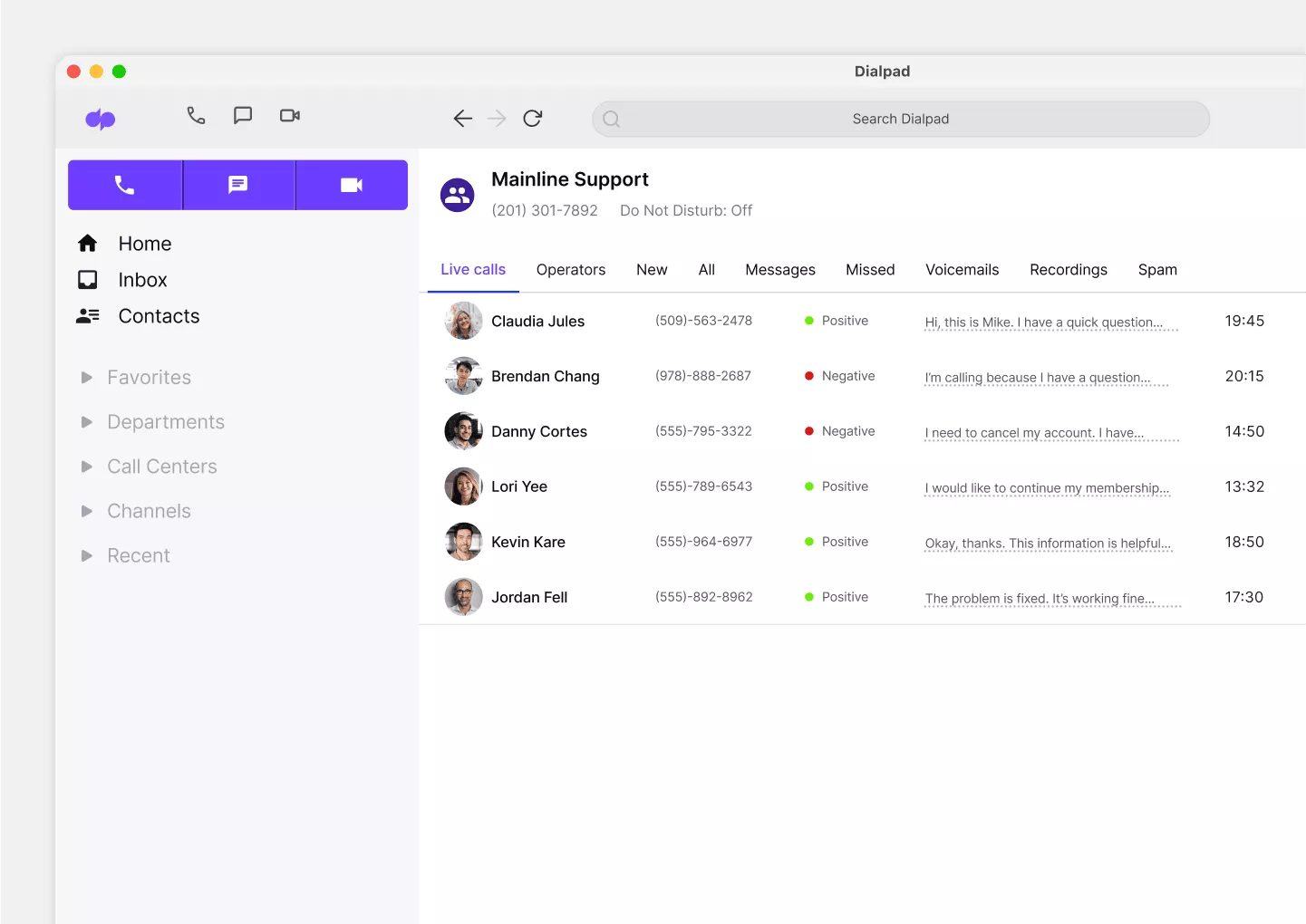
Beyond call recordings, Dialpad Ai Contact Center also has real-time voice transcription and sentiment analysis to show supervisors which calls are going well (or poorly). This makes it much easier for a manager to oversee multiple agents and ongoing calls at once—and jump in to help when needed.

Faster training and onboarding
With Dialpad’s call recordings, you can train and onboard new staff more quickly. Jumping into a contact center queue can be pretty intimidating if you haven't even had your first phone conversation yet. What better way to teach your new hires than with examples from some of your best call agents?

Make a playlist
Create a coaching playlist with recordings of your best (or worst) calls to help your new hires. From tough pricing questions to objection handling, you can create specific playlists for teammates to listen to and learn from on their own time.

AI-powered meeting recaps
Not only can Dialpad Ai record calls and transcribe them in real time, it also generates call summaries in friendly, natural language along with transcripts that you can search to find specific points of interest. This way, you don’t have to listen to hours of recordings to find that one little thing.

Robust privacy and security
Call recording comes with its fair share of privacy and security concerns. Dialpad's APIs allow you to automatically pause recording and/or transcription when your agents are taking sensitive information. (Like when they open a screen or field to take down healthcare info.)

Call parking
Manage large numbers of incoming calls more easily using Dialpad’s call park feature. With call park, your agents can move calls to a virtual “parking lot” where teammates can pick up calls from another extension once they're available. If your business gets a lot of inbound calls, this is a very useful feature to have.
👉 Did you know?
Dialpad's unified communications and contact center platform comes with call recording—and also functionality like SMS and instant messaging, CRM integrations, and more.
Need to record calls?
Sign up for a 14-day free trial of Dialpad in just a few minutes to get started with a virtual business number and try call recordings now. Or, take a self-guided interactive tour of the app on your own first!
“
We love that we can jump right in on Dialpad, pull call recordings, and listen to those. And we can set it so that recording starts automatically, so we don’t have to say ‘Don’t forget to hit record on the call.
”Will Musto
Director of Operations at The Roman Group
Business call recording: The key to improving performance
You don’t hear a lot about it, but call recording is a tool that anyone who does business on the phone needs. (Especially if you work at a business with a contact center.)
From empowering you to allocate resources more efficiently to monitoring performance and understanding customer pain points, the insights you can glean from contact center call recordings is vital when it comes to keeping your customers happy.
FAQs about call recordings
What is call recording?
Call recording is a pretty common business phone system feature that lets you, well, record phone calls with customers and prospects. The thing to keep in mind is that there are regulations and laws about consent—in most states, you can't legally record calls without the other person knowing that it's being recorded. Learn more about call recording disclosure rules.